

Before assigning a quantity of LED high bays to one switching device, identify the exact driver, supply condition, switching device, and group that will start together. Fixture wattage and steady input current help describe the operating load, but they do not by themselves establish how the switch will experience the brief startup event.
The useful question is not “How many fixtures can this relay handle?” in the abstract. It is “What documented combination of driver, voltage, startup characteristics, switching duty, and simultaneous quantity has the responsible equipment supplier accepted?” Build that record before converting a current rating into a fixture count.
Identify the device that actually opens and closes the load
Start with the approved sequence and one-line documentation. The user interface, sensor, schedule, or network command may not be the component that carries the lighting load. Record the device whose contacts or electronic output actually switch the branch, along with its exact model, revision, pole arrangement, and the output being used.
Do the same for the lighting equipment. Record the fixture family and complete configuration, the installed driver identity, input voltage, selected wattage where applicable, control option, and any manufacturer document that applies to that combination. The current PacLights FLHE linear high-bay family publishes operating input-current information by voltage and configuration. Those operating values are important schedule data, but the family page does not provide a universal number of fixtures for every switching device.
Keep identities configuration-specific. A family may include several output levels, voltage options, control packages, and driver generations. A familiar housing or matching family name is not evidence that the internal driver and startup behavior are unchanged.
Separate steady operating current from startup behavior
Steady input current describes the normal operating condition after the driver has started. Inrush describes a brief input-current event as the driver’s input circuitry energizes. These are different characteristics, so a simple division of a switch’s general amp rating by fixture running current can miss the startup duty that matters to the switching output.
Ask the driver or luminaire supplier for the startup information available for the exact configuration. Useful documentation may state a peak value, duration, test voltage, ambient condition, point on the waveform, and method used to characterize the event. Preserve all of those conditions together. A peak without duration, or a duration without the stated test conditions, is not enough to compare two data sheets confidently.
Do not copy an inrush value from a different driver because the wattage looks similar. Driver architecture, input components, voltage, and product generation can change the waveform. Likewise, do not treat a single peak value as a field measurement or as proof of how several devices will add in a particular installation. Use the manufacturer’s stated data and the switching-device maker’s application method.
Read the switching-device rating for the actual load duty
A switching device may carry several ratings for different load types, voltages, operating frequencies, or expected electrical life. Use the manufacturer’s rating or application table that applies to electronic LED loads and the intended switching duty. A general resistive-load value, enclosure label, or maximum current shown elsewhere in the catalog may not answer the LED-driver question.
Confirm whether the device documentation expresses the limit as current, power, a maximum number of a specified driver, an inrush curve, or another application-specific method. Follow that method exactly. Do not translate one category into another without the manufacturer’s instructions, and do not assume that a control input rating is the same thing as the load-output rating.
Where the documentation is silent or uses terms that do not match the selected driver data, send the exact equipment list and question to the responsible manufacturers or supplier. The resolution should identify the driver, voltage, switching output, quantity, simultaneous-start assumption, and document revisions. “Approved for LED” is too broad for a purchasing or commissioning record.
Define the simultaneous switching group
The quantity that starts together can differ from the total fixture count in the area. Record the fixtures assigned to the switching output and the command conditions that cause them to energize. If zones are intentionally staged, document the stages rather than assuming a delay exists because the control system is networked.
Check the final group membership against the control schedule, panel schedule, and commissioning record. The lighting-controls handover guide explains how stable zone IDs, device identities, settings, and unresolved exceptions make the system maintainable. Add the switching output and simultaneous group to that same evidence trail.
Also distinguish normal switching from dimming commands. A low-level command does not necessarily remove input power, and a user-interface “off” state may be implemented differently across systems. The 0–10V dim-to-off acceptance guide separates minimum output, the intended off state, and restoration. Use the approved sequence to determine when the load-switching device actually operates.
Build a review package another person can check
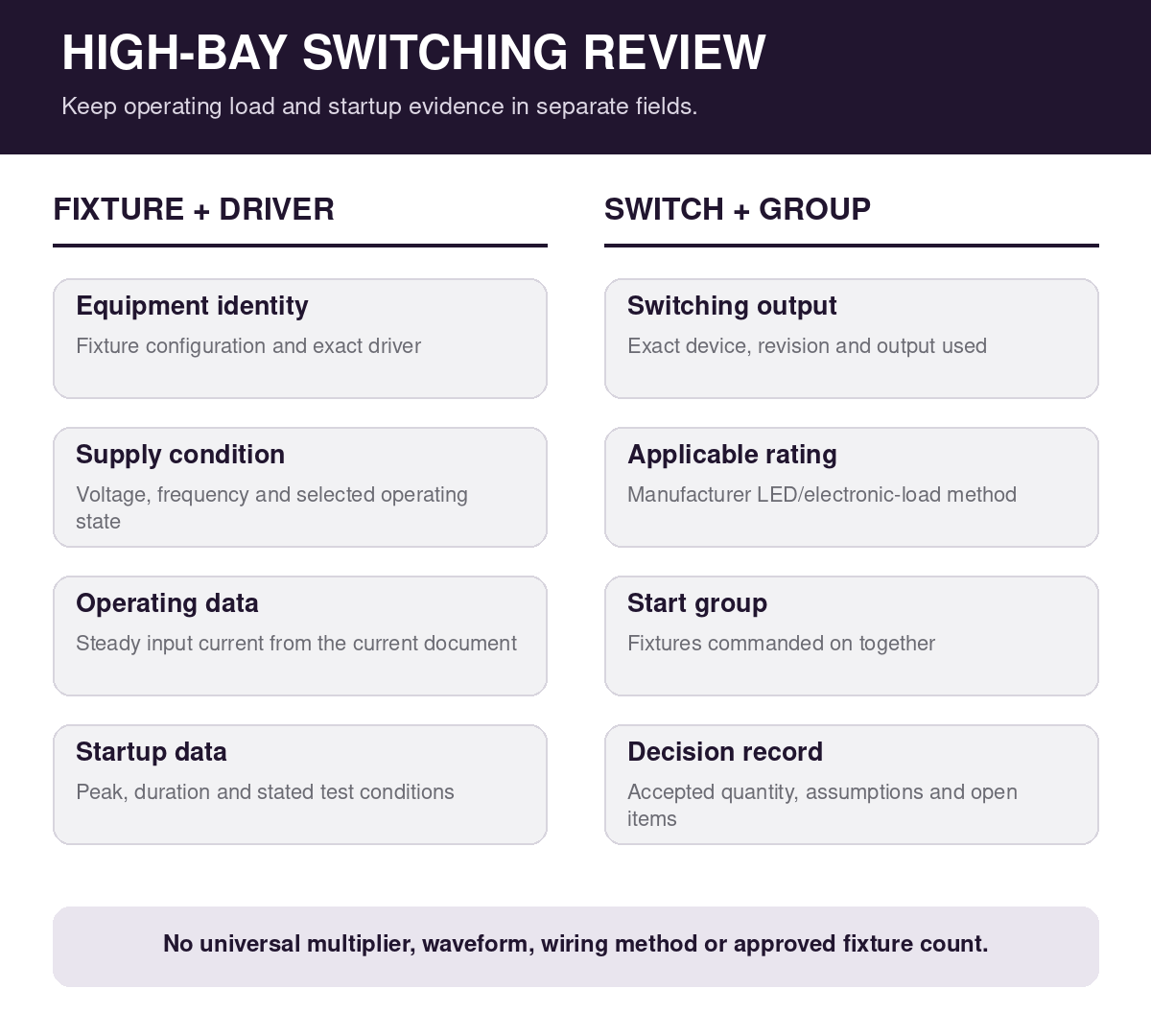
Assemble one page of stable evidence before asking for a permissible quantity. Include the fixture and driver identities; selected voltage and wattage; driver startup data with conditions; switching-device model, output, and applicable LED-load rating; group quantity; simultaneous-start assumption; expected switching frequency; document revisions; and the unresolved question.
Mark missing information as unresolved. Do not fill a blank startup duration with a typical value, borrow a switch rating from a related model, or turn fixture watts into a made-up inrush multiplier. A transparent gap gives the supplier a precise question. An estimated number can look like an approved design input after it is copied into a schedule.
Keep the review aligned with other fixture constraints. Driver and fixture identity can also affect temperature limits and product documentation, so the high-bay ambient-temperature record is a useful companion when the same submittal is being checked. Treat thermal suitability, switching duty, dimming behavior, and emergency operation as separate decisions unless the manufacturer’s documents explicitly connect them.
Commission the accepted configuration, not a generic rule
After the equipment team accepts the combination, carry the approved quantity and assumptions into the final schedules. Verify the installed driver and switching device match the record. Confirm the actual group membership and intended sequence without changing wiring or settings outside the authorized commissioning procedure.
During functional testing, record the starting state, command source, fixtures expected to respond, observed response, and exceptions. An apparently successful test does not replace the manufacturer’s rating, and a rating does not prove that the installed grouping and sequence are correct. Both the documentation check and the functional check have distinct purposes.
Preserve the accepted equipment schedule with the document revisions and date. If a driver, fixture configuration, switch, voltage, grouping, or control sequence changes, reopen the relevant review. Do not let a replacement inherit an old fixture-count decision only because the nameplate wattage is similar.
Close the question with exact identities
A defensible switching review ends with a traceable statement: these exact fixtures and drivers, at this supply condition, are assigned to this switching output, start under this grouping assumption, and were evaluated using these manufacturer documents. Any limitation or open question remains visible.
For a PacLights configuration review, provide the full FLHE ordering configuration, driver identification when available, supply voltage, proposed switching device and output, simultaneous fixture quantity, operating sequence, and the current device documentation. That package supports a specific answer without turning one project decision into a universal high-bay fixture-count rule.
Disclaimer: PacLights is not responsible for any actions taken based on the suggestions and information provided in this article, and readers should consult local building and electrical codes for proper guidance.