

When a replacement high bay looks different from the fixtures beside it, do not start by declaring a color defect or changing settings by trial and error. First build a configuration record: the approved zone baseline, the installed and replacement fixture identities, the documented color-temperature setting, and the conditions under which the difference was observed.
That record separates a correctable setting mismatch from a product-generation, optical, aging, or color-quality question that needs manufacturer review. A matching Kelvin label is useful, but it does not by itself prove that two fixtures will look identical in the space.
Start with the accepted zone baseline
Define what “matching” means for this maintenance event. Record the area or zone, the task being supported, and the fixture group that was accepted together. Use the approved fixture schedule, submittal, commissioning record, or maintenance baseline rather than a verbal description such as “same white as the rest.”
Include the baseline fixture family, generation or revision when known, ordered CCT, selected field setting, optic, output setting, control option, and installation date. If the zone includes mixed equipment by design, mark that explicitly. The goal is not to reconstruct every project document; it is to identify the reference against which the replacement is being judged.
Describe the observed difference without turning the observation into a diagnosis. Useful notes include which fixtures appear different, where the observer stood, whether the difference appears on the luminaires, the illuminated surfaces, or both, and whether it remains visible after the fixtures have reached normal operation. Photographs can help locate the comparison, but automatic exposure and white balance mean they should not be treated as color measurements.
Identify both fixtures beyond the housing
Two high bays can share a familiar housing while differing in generation, LED package, driver, optic, selectable settings, or ordering configuration. Record the complete model and label information for the installed reference and the replacement. Include the purchase or work-order reference and any documentation revision used for the replacement decision.
The current PacLights FLHE linear high-bay family documents field-selectable color temperature. That confirms the setting is an important configuration field for this family; it does not establish that every old and new high bay, or every generation of the same family, will have identical visual appearance at the same nominal setting.
Keep the model identity and setting identity as separate fields. A complete model number can establish the ordered configuration, while a documented selector position can establish the field setting. If either is unreadable or missing, mark it unresolved. Do not infer a setting from the perceived color of the light.
Verify the documented selectable setting
Only authorized personnel should inspect or change a field-selectable setting, following the current manufacturer instructions and the site’s electrical safety procedure. Maintenance records should state who verified the setting, the applicable instruction revision, the observed selector position, and whether the fixture was returned to service without an unauthorized adjustment.
Do not move the selector simply to see what happens. An undocumented change can erase evidence, create a new mismatch, or depart from the approved schedule. If the installed baseline and replacement use different selector labels or different generations of documentation, send the exact identities to the supplier before treating the positions as equivalent.
The fixture-configuration cross-reference guide uses the same principle for photometric files: the full equipment configuration must correspond to the document being relied on. Here, the maintenance team applies that discipline to the actual replacement, its CCT setting, and the zone baseline.
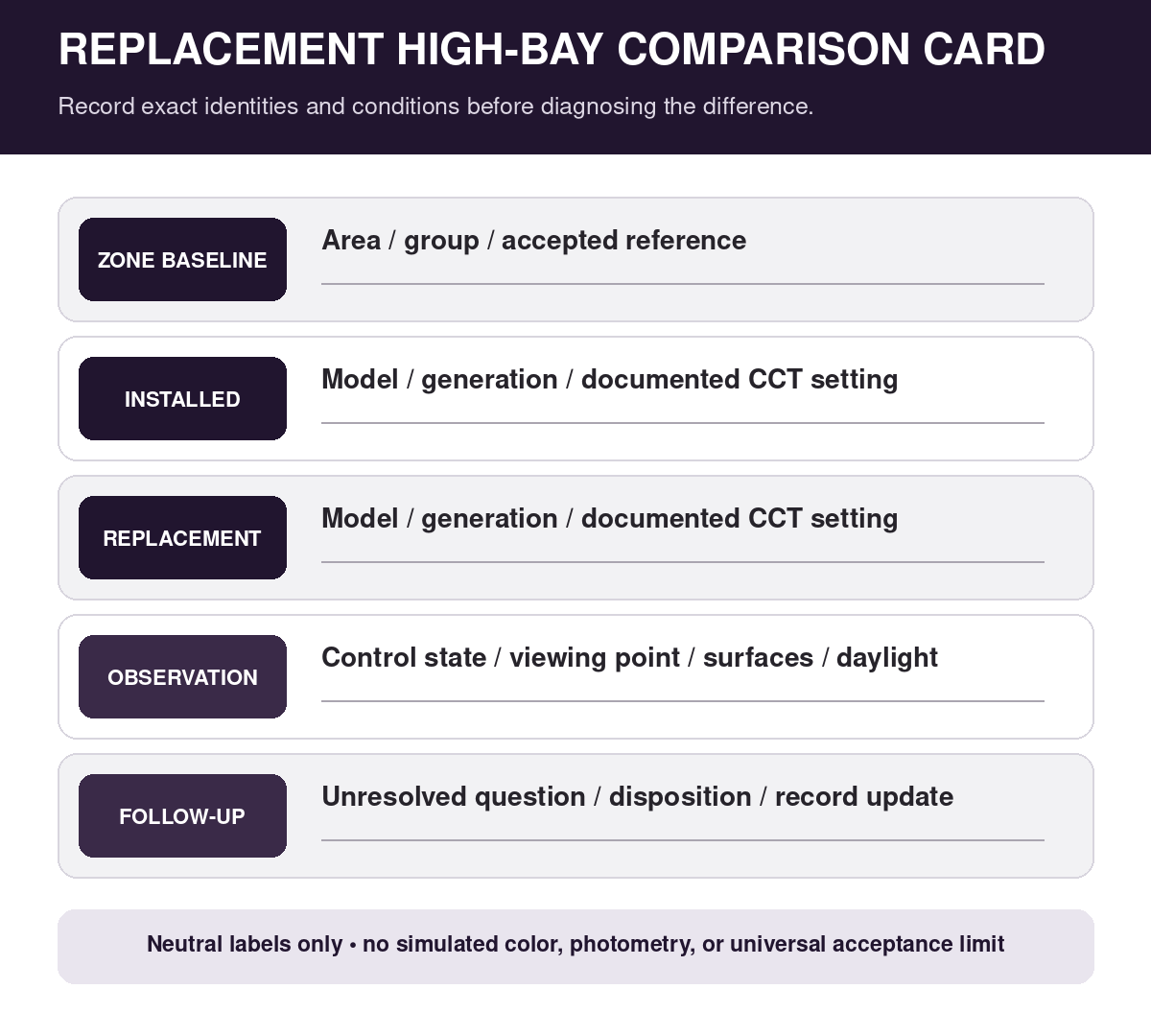
Compare under consistent operating conditions
Visual comparisons become more useful when the operating conditions are controlled. Record whether both fixtures were fully energized, dimmed, in standby, under daylight influence, or responding to an occupancy sequence. Note the approximate observation time, the surfaces being compared, and any nearby daylight, skylights, colored finishes, reflected product colors, dust, or temporary obstructions.
Use the same viewing location and task surfaces for the installed and replacement fixtures. A person looking directly at the luminous panels may perceive a difference that is less apparent on the work plane, while a colored rack face can make the illuminated surfaces look different even when the fixtures appear similar. Record both observations rather than collapsing them into one “pass” or “fail.”
Controls also matter. A replacement operating at a different dimming level can shift perceived brightness and make color differences more noticeable. Confirm the zone membership, command state, and output setting before comparing appearance. The check is not complete merely because both fixtures turn on.
Separate CCT from other color and appearance questions
Correlated color temperature describes the general warm-to-cool appearance of nominally white light. It is not a complete description of color rendering, chromaticity tolerance, spectral distribution, optical mixing, lumen depreciation, or the appearance of the surrounding surfaces. Two products with the same nominal CCT can therefore look different without either label being false.
Color rendering is another distinct characteristic. A matching CCT does not guarantee that colors in merchandise, labels, packaging, or finishes will appear the same. Likewise, an older fixture may have accumulated operating hours, dust, lens changes, or thermal history that a new fixture has not. These possibilities should be recorded as questions, not converted into a field diagnosis without applicable measurements and manufacturer criteria.
A visual observation is valuable because it identifies where the team needs to investigate. It is not a substitute for instrumented testing when the project requires a quantitative color comparison. If the exact model, documented setting, and operating conditions match but the difference remains material, provide the supplier with the traceable record and ask what configuration-specific evidence or measurement is required.
Use a repeatable observation record
For each comparison, record the zone ID; accepted baseline; installed fixture model, generation, and setting; replacement model, generation, and setting; control and output state; observation location; illuminated surfaces; daylight condition; elapsed operating condition; photographs used only for location context; and the unresolved question.
Keep measurements and visual notes separate. If the team also checks illuminance, define the task plane, meter orientation, control state, and loading condition. The warehouse rack-face measurement guide explains why a repeatable surface and viewing direction matter. Do not use a floor reading to settle a color-appearance question or use a color observation to infer illuminance.
Preserve the original observation when a setting or fixture is later corrected. Add the change, date, responsible person, and follow-up result instead of overwriting the first record. That history helps the next replacement team distinguish a known baseline from a new issue.
Escalate with an exact, answerable question
A useful supplier request includes the complete installed and replacement identities, label photographs, documented selector positions, current product instructions, purchase records, zone baseline, control state, and consistent-condition observations. Ask whether the two configurations are intended to match visually at the recorded settings and what additional evidence is needed if they do not.
Avoid broad requests such as “send a whiter fixture” or “match the old light.” Those descriptions are difficult to verify and can create another undocumented substitution. The answer should resolve a specific configuration, identify any approved change, and state how the accepted zone baseline will be updated.
Close the maintenance event without losing the baseline
After the replacement is accepted, update the maintenance record with the final fixture identity, documented setting, date, and disposition. If the resolution required a different approved configuration, retain the reason and authorizing document. If the remaining variation is accepted, record that decision rather than implying the fixtures were identical.
For a PacLights configuration review, provide the exact high-bay model information, photos of both labels and selector positions, the applicable product documents, control and output conditions, zone baseline, and the observed surfaces. That package lets the product team answer the actual replacement question without turning one visual comparison into a universal rule about LED color consistency.
Disclaimer: PacLights is not responsible for any actions taken based on the suggestions and information provided in this article, and readers should consult local building and electrical codes for proper guidance.