

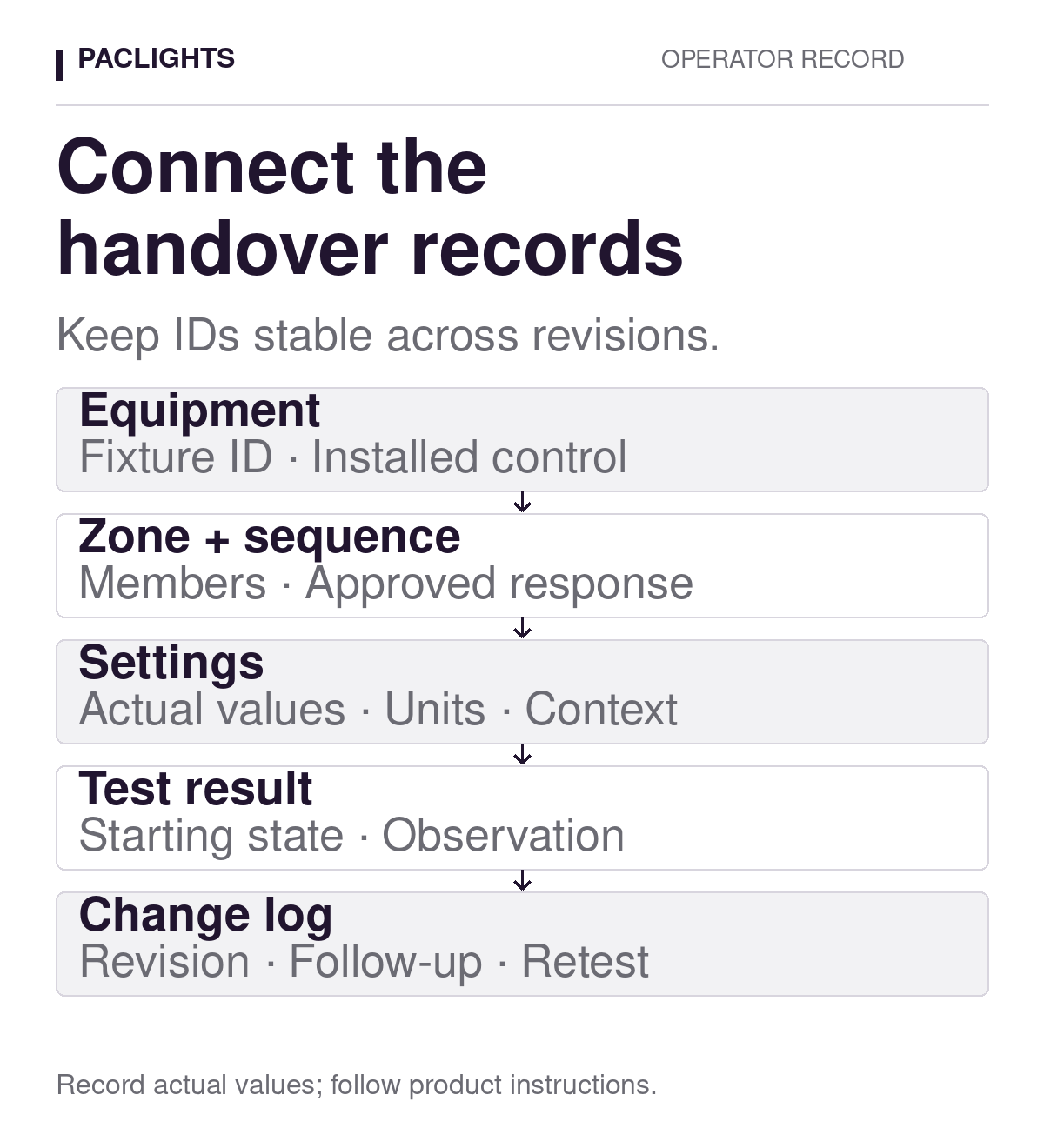
A useful lighting controls handover record connects each installed fixture and control to its zone, approved operating sequence, final settings, and test results. Keep those connections stable when equipment or settings change. A folder of manuals is useful background, but it cannot explain why a particular group behaved differently during yesterday’s shift.
Build the record around a question an operator can answer: which equipment was supposed to respond, under what conditions, and what was actually observed? That structure helps a facility team distinguish a changed requirement from a changed setting or an unresolved fault. It also gives the commissioning team a clear way to hand over exceptions without presenting them as completed work.
Start with the installed fixture and control schedule
Give each fixture a stable identifier that appears on the current drawing and equipment schedule. Record its location, fixture model and generation, supplied control option, and the document revision used to identify it. Keep the physical fixture identifier separate from any editable name in a configuration interface. If a name changes, the equipment record should still point to the same location and history.
The product family alone is not enough. PacLights’ FLHE linear high-bay family offers different occupancy, daylight, and networked control options. The handover schedule should identify the option actually supplied, together with the applicable instructions. Do not copy a setting from another fixture simply because the housings look similar.
For a commercial interior using FDLA commercial downlights, record the installed model and any selected sensor or control accessory in the same way. A fixture’s dimming capability does not establish which accessories were purchased, how a zone was configured, or whether its complete sequence has been tested.
Link zone membership to an approved sequence
A zone name should identify a defined set of fixtures, not just a room. Keep a membership list showing which fixture IDs respond together and which sensors, schedules, or manual controls can command them. Identify cross-zone commands explicitly. A sensor mounted on one luminaire may influence a wider group; that relationship needs its own record rather than an assumption based on proximity.
Attach the approved sequence revision to the zone record. Describe the occupied response, permitted standby or off behavior, daylight response, relevant priorities, and restoration after an override or power interruption. Use the project’s approved requirements and the capabilities of the selected equipment. Where a requirement remains unresolved, mark it as an open decision rather than filling the gap with a convenient default.
For daylight functions, the distinction between switching and dimming belongs in that sequence. The PacLights guide to daylight harvesting and daylight on/off control explains why operating limits and restoration behavior need explicit definitions. Referencing that background is useful; the handover record must still state the response chosen for this zone.
Record settings with units and operating conditions
Capture the final values after testing, including the setting name, value, unit, and the equipment or zone to which it applies. Preserve the terminology used by the actual control. A field called hold time should not be relabeled standby time if the product treats them as different stages. For percentage settings, state what the percentage represents; a commanded output value is not automatically a measurement of illuminance or electrical power.
Include the relevant context: active schedule, permitted overrides, enabled daylight function, and any supported test mode. Record the configuration date and the applicable drawing or sequence revision. If the interface provides a configuration export, retain an authorized copy in the project’s controlled location and identify its revision. Do not promise that every control supports exports, remote diagnostics, or the same set of adjustable parameters.
Keep access credentials out of the general handover worksheet. Identify the responsible role and the approved access process without putting passwords or recovery information into a document that may circulate among contractors. Separately identify which adjustments the operator is authorized to make and which require the designer, installer, or controls specialist.
Separate the expected response from the observation
A test record needs both the requirement and the observed result. Reference the approved sequence, list the starting conditions, describe the action taken, and record which fixture IDs responded. Include the return to standby or off and the next restoration where those are part of the intended operation. An activation demonstration alone does not establish the complete sequence.
For example, an illustrative test entry might state that a zone began at its documented unoccupied state, with the normal schedule active and no manual override. The observation then identifies which fixtures changed state during the designated approach and how they returned afterward. The project supplies the acceptance criteria and actual values; this example does not prescribe a delay, threshold, or output level.
Use neutral observations before proposing a cause. “Fixture F-12 remained at standby while the rest of Zone Z-03 responded” is more useful than “network problem.” Record relevant daylight, obstructions, and other activity so a later test can reproduce the conditions. The parking-garage sensor walk-test guide shows how routes and starting states make functional observations repeatable.
Keep functional response evidence separate from illumination measurements. If illuminance is assessed, identify the measurement locations, plane, units, instrument, and project criteria in the appropriate test record. Neither a sensor response nor a control-interface percentage establishes that task lighting meets the design requirement. Required emergency and egress functions remain within their separately approved design and procedures.
Use a compact index to keep the evidence connected
The following blank structure can sit at the front of a handover package. Use links or document references that the operator can actually open. Avoid making a single spreadsheet carry every manual, drawing, and detailed test record; its main job is to identify the current evidence and the relationships between it.
- Equipment record
- Fixture ID, location, installed model/control option, and applicable instruction revision.
- Zone record
- Zone ID, member fixture IDs, command sources, and approved sequence revision.
- Settings record
- Setting name, actual value and unit, applicable equipment, date, and authorized configuration reference.
- Test record
- Requirement reference, starting conditions, action, observations, result, and unresolved exception.
- Change record
- Reason, previous and revised references, authorization, affected tests, and closeout evidence.
Check the index during handover with someone who will operate the system. Ask them to locate one fixture, identify its zone, find its required response, and open the corresponding test. A missing link discovered at this stage is straightforward to assign and close. A document marked final should not hide an inaccessible attachment or an unrecorded exception.
Preserve the baseline when something changes
Keep the accepted baseline and append a change history rather than replacing the old values without explanation. For each change, record why it was requested, who authorized it through the project process, what changed, and which records and tests are affected. Mark superseded revisions clearly while retaining them according to the facility’s document policy.
A replacement sensor, altered group membership, moved partition, changed rack arrangement, or revised operating schedule can justify reviewing the affected sequence. Determine the repeat-test scope from the actual change. Updating a settings file does not close the work until the relevant response has been checked and any resulting exceptions have a documented outcome.
For a PacLights project review, bring the current fixture/control schedule, zone drawing, approved sequence, and the specific test or change record that needs attention. Those documents make the discussion concrete: the installed equipment, the intended behavior, the observed difference, and the evidence needed to close it.
Disclaimer: PacLights is not responsible for any actions taken based on the suggestions and information provided in this article, and readers should consult local building and electrical codes for proper guidance.